Auto Crop Pictures | A Quick New Way To Straighten & Crop Your Pictures

Trevor Dayley

In order to save time during post-production, it’s important to optimize your workflow by knowing as many shortcuts and tools as possible. In the previous video, I showed off my favorite new tool in Lightroom CC: The Dehaze Slider. In this second video, I’ll show you my second favorite tool: the auto straightening tool.

Lightroom Autocrop Tips

Pressing “R” Is A Shortcut To The Crop Tool

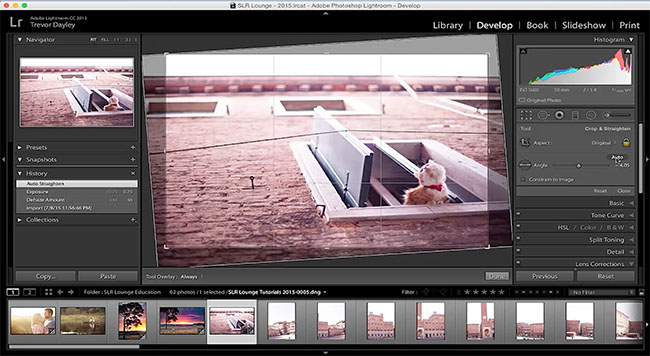
A new tool in Lightroom CC is the auto crop tool found in the crop & straighten tab. The quickest way to get there is by pressing the keyboard shortcut: “R.”

I took this whimsical picture shown above when I was walking through Venice, Italy. I press R to get to the crop tool, click “auto,” and Lightroom CC automatically straightens the picture.

Conclusion

I hope you guys enjoyed this quick tutorial on the auto crop & straighten tool. Stay tuned for my third and next video, where I show you my third favorite tool in Lightroom CC. If you’re interested in learning more shortcuts and tools, please subscribe to our YouTube channel.

Trevor Dayley

Trevor Dayley is an award-winning wedding photographer based in Scottsdale, Arizona. He has photographed over 450 weddings across the United States and internationally, and has been recognized as one of the Top 100 Wedding Photographers in the World by SLR Lounge and one of the Top 30 Most Influential Photographers by BrandSmash. Voted the number one wedding photographer in Arizona by AZ Bridal Magazine, Trevor has also spoken at major industry events including WPPI and contributed to photography education at Fstoppers and MagMod. His articles at SLR Lounge cover wedding photography technique, lighting, and gear. He can be found at trevordayley.com and on Instagram at @trevordayley.

More articles by Trevor Dayley →

RELATED POSTS

Aiarty Video Enhancer: Restore Old, Soft, and Noisy Footage to Cinematic 4K with AI (36% OFF Lifetime + Extra Coupon)

June 10, 2026

If you shoot video with any regularity, you have almost certainly ended up with...

Aftershoot Is Now a Complete Photographer Workflow Platform, From Culling to Client Galleries

May 29, 2026

Aftershoot started as an AI culling tool. Then it added AI editing. Then AI...

DxO Nik Collection 9 Review | A Complete Suite For Photo Editors

May 22, 2026

In a world where creativity itself is being outsourced to what I will politely...

Vividon Launches AI Relighting Plugin for Photoshop That Requires Zero Prompting

May 22, 2026

Most tools that promise to fix problems in post generally deliver on that promise,...