How Does Exposure Compensation Work?
When you shoot in manual mode, you control every part of the exposure yourself. But sometimes, it’s easier to use semi-automatic or fully automatic modes. The thing is, your camera’s light meter isn’t always spot on. It tries to treat every scene so that it averages out to 18% gray. That’s fine for a lot of shots, but not for all.

For example, if you’re shooting something in snow, the camera reads all that white and thinks it should tone it down to gray. The result is darker photos that don’t match what you see. Same thing with mostly dark scenes. Your camera might brighten them too much.
When you’re in manual mode, you can fix this by adjusting shutter speed, aperture, or ISO yourself. But if you’re not in manual, your camera gives you a way to override what it’s doing. That’s where exposure compensation, or EV Compensation, comes in.
You’ll find this option either on a dial, a button, or in the camera menu. With it, you can tell the camera to brighten or darken the shot by a certain amount, usually in third-stop steps. Say you take a photo, check the histogram, and it looks too dark. You can dial in something like +0.7, and the next photo will be brighter by two-thirds of a stop.

The key thing is to remember to reset it once you’re done. If you don’t, the next time you shoot, you might be wondering why every shot is overexposed or underexposed.
What Is An Example of Exposure Compensation?
When you take a photo of someone standing in front of strong backlighting, like the sun behind them or a bright window, your camera gets confused. It tries to balance the bright background with the person in front. The problem is, the camera exposes for the bright light, and that makes the person’s face come out much darker than it should. This is where positive exposure compensation comes in. By dialing it up, you brighten the whole image so the person’s skin tones look natural instead of shadowy and lost.
Snowy scenes give you another classic example. Since snow reflects so much light, your camera’s meter thinks the scene is too bright and lowers the exposure automatically. The result is dull, grayish snow instead of crisp white. Adding positive exposure compensation tells the camera to brighten things up, so the snow looks clean and white the way your eyes actually see it.
How Much Is a Typical Exposure Compensation Range?
Exposure compensation is your way of telling the camera, “Hey, I don’t fully agree with your choice so let’s make this brighter or darker.” Normally, the camera picks exposure settings based on what its light meter reads, but sometimes those choices don’t match how you want the photo to look. By using exposure compensation, you can nudge the brightness up or down without switching everything into full manual mode.
You’ll find this tool available in the semi-automatic modes, like aperture priority, shutter priority, and program mode. In these modes, you set one part of the exposure, and the camera decides the rest. The compensation setting acts as your override button.
Most cameras give you a scale that runs from -3 EV to +3 EV, with 0 in the middle as the default.
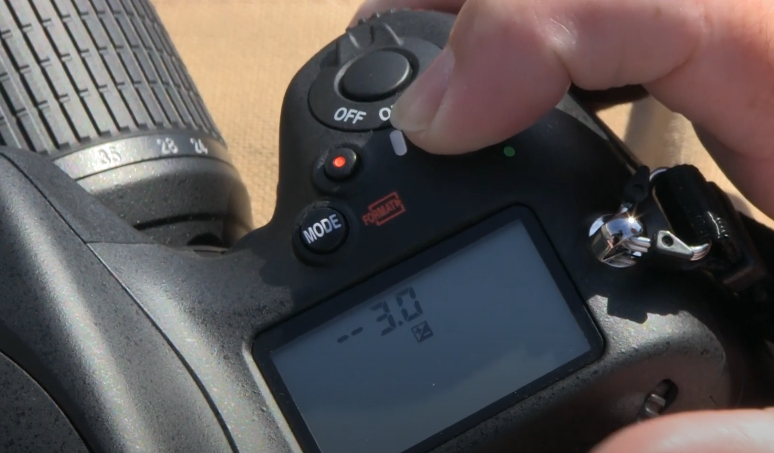
If you set the dial to a positive number, the captured shot becomes brighter. That’s useful for subjects in shadow, snowy scenes, or backlit portraits where the camera underexposes. If you set it to a negative number, the image becomes darker. This is handy when the camera is overexposing, like when you’re shooting a brightly lit building against a pale sky.
By shifting this scale, you’re directly influencing how the camera interprets the light. It’s not complicated. You’re basically telling the camera to give more or less light than it thinks is right, so the final photo matches what your eyes actually see.
Is There Any Difference Between ISO and Exposure Compensation?
AUTO ISO is a handy setting because it lets the camera decide the sensitivity of the sensor for you. Instead of you having to pick the ISO number yourself, the camera adjusts it automatically so that your shot doesn’t turn out too dark or too bright. This is useful when lighting conditions are changing quickly, like moving from shade into sunlight.
Now, even with AUTO ISO on, you still have some control over how bright or dark the picture will be. This is where exposure compensation, or EV, comes in. When you dial in positive EV, you’re telling the camera to let in more light overall, which makes the picture brighter. Negative EV does the opposite. It darkens the image. What’s really happening in AUTO ISO is that the camera changes the ISO level to follow your EV input.
Here’s the technical side made simple. If your aperture and shutter speed are locked and don’t move, then adjusting exposure compensation only changes the ISO. A 1-stop increase in EV doubles the ISO value, which makes the sensor twice as sensitive to light. For example, ISO 200 would become ISO 400. A 1-stop decrease cuts it in half, so ISO 200 would drop to ISO 100. That’s why you’ll notice brighter or darker shots even though the aperture and shutter speed haven’t changed.
SaveSaveSaveSave
Related Articles to Exposure Compensation Definition